







An AI CRM Assistant is transforming how businesses manage customer relationships, moving beyond simple data entry to proactive intelligence. Unlike traditional CRM systems that just store contact info and log calls, an AI driven assistant learns from every interaction. It predicts customer needs. It automates repetitive tasks. And it gives your sales and support teams superpowers they never knew they had.
In this guide, I’ll walk you through the core features, the real benefits, and the many ways you can put an AI CRM Assistant to work in your business. No fluff. Just practical insights from someone who lives and breathes CRM technology every day.
What is an AI CRM Assistant?
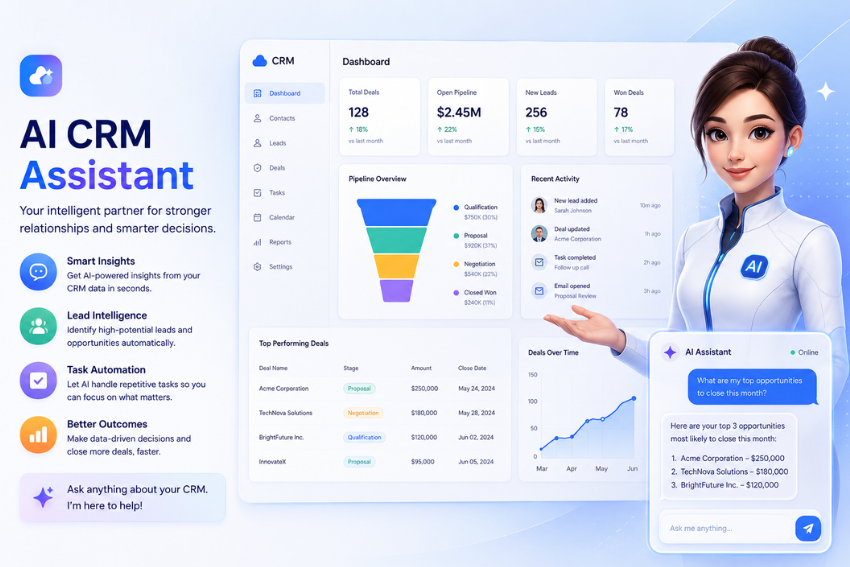
Think of it as a smart layer on top of your existing CRM. It uses machine learning, natural language processing, and predictive analytics to handle things that used to eat up hours of human time. You still have your contacts, deals, and pipelines. But now you also have a digital teammate that works 24/7. It suggests the next best action. It drafts emails for you. It even scores leads so you know exactly who to call first.
Traditional CRMs are reactive. You enter data, then run reports. An AI CRM Assistant is proactive. It alerts you before a deal goes cold. It reminds you to follow up with a customer who hasn’t replied in two weeks. And it does all of this without you lifting a finger.
Core Features of an AI CRM Assistant
Let’s break down the must-have features. You’ll see these in any serious AI CRM Assistant today.
Smart Lead Scoring
Not all leads are equal. The assistant analyzes hundreds of signals like email opens, website visits, social media engagement, and past purchase behavior. It then assigns a score to each lead. Your sales team knows instantly which prospects are hot and which need more nurturing. No more guessing. No more wasting time on people who will never buy.
Automated Data Entry
How many hours does your team spend typing notes, updating contact fields, and logging call outcomes? An AI CRM Assistant eliminates that grunt work. It listens to sales calls, reads emails, and extracts key details automatically. Then it updates the CRM record in real time. Your reps stay focused on selling, not data janitor work.
Next Best Action Recommendations
The assistant studies your team’s behavior and historical win rates. When a rep opens a deal, the AI suggests the most effective next step. Maybe it’s sending a case study. Maybe it’s scheduling a demo. Maybe it’s just waiting three days before following up. These recommendations are adopted as new data comes in. The more you use it, the smarter it gets.
Email Drafting and Personalization
Writing personalized emails to dozens of prospects is exhausting. An AI CRM Assistant generates draft emails based on the recipient’s industry, past conversations, and even their tone. You just review and click send. It also suggests subject lines that get opened and follow up reminders that actually convert.
Sentiment and Intent Analysis
Ever lost a deal because you didn’t realize a customer was frustrated? The assistant scans email language, chat transcripts, and call recordings. It detects frustration, hesitation, or excitement. Then it flags at risk accounts for immediate attention. You can also see which prospects are showing strong buying intent based on their word choices and response times.
Predictive Forecasting
Spreadsheets are terrible at predicting revenue. An AI CRM Assistant analyzes pipeline velocity, rep performance, seasonal trends, and macroeconomic indicators. Then it gives you a forecast that actually makes sense. You’ll know which deals are likely to close this month and which are probably going to slip.
Automated Workflow Triggers
Set up conditional rules that fire automatically. For example: when a lead hits a score of 85, the assistant assigns them to the top sales rep and sends a calendar invite. When a support ticket goes unresolved for 24 hours, it escalates to a manager. These workflows run without human supervision, freeing your team for higher value work.
Key Benefits of Using an AI CRM Assistant
Now let’s talk about why you actually want one. The benefits go way beyond convenience.
Massive Time Savings
Sales reps spend only about one third of their day actually selling. The rest goes to admin, data entry, and hunting for information. An AI CRM Assistant slashes that waste. We have seen teams cut CRM related admin time by 60 to 80 percent. That means your reps can make more calls, send more emails, and close more deals with the same headcount.
Higher Win Rates
When you combine lead scoring, next best action recommendations, and sentiment analysis, something beautiful happens. Your reps always know where to focus. They stop chasing bad leads. They catch at risk accounts before those accounts churn. And they show up to every conversation prepared. The result? Win rates go up anywhere from 15 to 30 percent in our experience.
Lower Customer Churn
Customer retention is where AI really shines. The assistant monitors health scores for every account. It tracks product usage, support ticket volume, payment history, and communication frequency. When an account shows signs of trouble, the assistant alerts your customer’s success team. You can intervene early instead of losing a customer to a competitor.
Better Data Quality
Bad data kills CRM value. Duplicate records, missing fields, outdated contact info – these problems plague every growing business. An AI CRM Assistant cleans up the mess automatically. It merges with duplicates. It validates email addresses. It enriches missing fields using public data sources. Your CRM stays accurate without anyone having to audit it manually.
Faster Onboarding for New Hires
New sales reps typically take months to ramp up. They don’t know which leads to priority. They don’t know the best outreach sequences. An AI CRM Assistant acts like a senior coach. It shows them exactly what to do next. It explains why certain recommendations work. New hires become productive in weeks instead of months.
Data Driven Decisions Without Data Skills
Most business owners and sales managers aren’t data scientists. That’s fine. The assistant translates complex analytics into plain English. You ask questions like “why did we lose the Johnson deal?” and the assistant gives you a clear answer. Maybe it was price. Maybe it was response time. Maybe a competitor launched a feature. You don’t need to build pivot tables or write SQL queries.
Practical Uses Across Industries
An AI CRM Assistant isn’t just for software companies. Here’s how different industries put it to work.
Real Estate
Real estate agents juggle dozens of leads at different stages. The assistant tracks every property showing, every email conversation, and every loan pre approval. It reminds agents to follow up with buyers after a weekend of open houses. It predicts which leads are ready to make an offer based on their search behavior. And it automatically updates property preferences as clients change their minds.
Financial Services
Wealth managers and financial advisors use AI CRM Assistants to stay compliant while personalizing outreach. The assistant flags communications that might violate regulations. It schedules check ins based on market volatility and client risk profiles. And it surfaces life events like a client’s child turning 18 (time to talk about college savings) or a recent job change (time to roll over that 401k).
Healthcare
Medical practices use AI CRM Assistants to manage patient relationships without breaking HIPAA rules. The assistant sends appointment reminders, tracks medication refill requests, and flags patients who haven’t scheduled their annual checkup. It also helps practices identify which patients would benefit most from new services based on their medical history and demographics.
Ecommerce
Online stores generate mountains of customer data. An AI CRM Assistant pulls it all together. It spots customers who abandoned a cart and sends them a personalized discount code. It identifies your most loyal buyers and suggests a VIP loyalty program. It even predicts which products a customer is likely to buy next, so your support team can make relevant recommendations during chat conversations.
B2B Services
Consulting firms, marketing agencies, and IT service providers rely on AI CRM Assistants to manage complex sales cycles. The assistant tracks every stakeholder involved in a deal. It reminds you to send meeting recaps. It analyzes past proposals to suggest win-based pricing. And when a contract is about to expire, it automatically kicks off the renewal process.
How to Implement an AI CRM Assistant Successfully
You don’t just flip a switch and watch magic happen. Follow these steps to get real value.
Start with Clean Data
AI is garbage in, garbage out. Before you turn on any assistant, clean up your existing CRM data. Remove duplicates. Fill in missing fields. Standardize how you log activities. This takes a weekend of work, but it pays back forever.
Train Your Team Properly
An AI CRM Assistant changes daily workflows. Some people will love it. Some will resist. Host hands on training sessions. Show them the time savings. Let them see how much easier their job becomes. And make sure managers model the behavior by using the assistant themselves.
Set Realistic Expectations
The assistant won’t close deals with you. It won’t magically fix a broken sales process. It’s a tool that amplifies what you already do well. Give it at least 30 to 60 days of usage before judging results. The AI needs time to learn your specific business patterns.
Monitor and Tweak
Review the assistant’s recommendations weekly. Are they helpful or annoying? If lead scores don’t match reality, adjust the weighting. If email drafts sound robotic, feed it better examples. You stay in control. The assistant just follows your lead.
Common Myths About AI CRM Assistants
Let me capture a few misconceptions.
Myth: It will replace my sales team.
Reality: It replaces boring tasks, not people. Your team still builds relationships, negotiates deals, and provides empathy that no AI can fake.
Myth: It’s only for big companies with deep pockets.
Reality: Many AI CRM Assistants are affordable for small businesses. Some cost less than a part time admin. The ROI comes from time savings and higher conversion rates.
Myth: It’s impossible to set up without a data science degree.
Reality: Modern assistants are designed for normal humans. You answer a few questions about your business. The AI configures itself. Most people get running in an afternoon.
Myth: It works the same for every industry.
Reality: The best assistants learn your specific vocabulary, sales stages, and customer personas. They adapt. A real estate assistant behaves very differently from a healthcare assistant.
Future Trends to Watch
AI CRM Assistants are evolving fast. Here’s what’s coming next.
Voice activated assistants inside your CRM. You’ll just say, “show me my top three deals this week” and the data appears. No clicking around.
Deeper integration with communication tools like Slack, Teams, and Zoom. The assistant will join your calls, take notes, and update the CRM automatically.
Generative AI that writes entire proposals and quotes based on conversation history. You just add the pricing.
Predictive churn prevention that not only flags at risk accounts but also suggests personalized retention offers that actually work.
Final Thoughts
An AI CRM Assistant is no longer a futuristic luxury. It’s a practical tool that helps you sell more, serve better, and stress less. Technology works. The results are real. And the cost has dropped to a point where almost any business can afford it.
The real question isn’t whether you should get one. The question is how soon you can start. Because while you’re reading this article, your competitors are already using AI to steal your leads and keep their customers happier.
Take the first step today. Sign up for a free trial. Feed it your data. Spend one week using it. I promise you won’t want to go back to your old way of working.
Frequently Asked Questions
How much does an AI CRM Assistant typically cost?
Pricing varies widely. Entry level plans start around 15 to 30 per user per month. Enterprise solutions with advanced features can run $100 or more. Most vendors offer free trials, so you can test before buying.
Can I add an AI CRM Assistant to my existing CRM?
Yes. Many AI assistants integrate with popular CRMs like Salesforce, HubSpot, and Pipedrive. You don’t need to switch platforms. Check the integration list before purchasing.
Is my customer data safe with an AI CRM Assistant?
Reputable vendors take security seriously. They use encryption, access controls, and compliance certifications like SOC 2 and GDPR. Always read their security documentation. And avoid free tools that might sell your data.
How long does it take to see ROI?
Most businesses see positive ROI within three to six months. The time savings alone usually cover the subscription cost. When you factor in higher win rates and lower churn, the payback period shrinks even more.
Do I need to be technical to use it?
Not at all. The whole point is to make advanced AI accessible to regular businesspeople. If you can send an email, you can use an AI CRM Assistant.