











Visual first impressions on the internet form in a fraction of a second, substantially shaping click-through traffic on listings.’ — National Association of Realtors
HDR real estate photo editing is one of the technical levers that determine whether that fraction of a second results in a click or a scroll past. The technique resolves the challenges that real estate photography has always faced: loss of shadow and highlight detail, and lighting imbalances. HDR editing addresses these challenges by merging bracketed exposures into one image that preserves detail across the tonal range and balances color in mixed-light scenes. For real estate, a well-edited HDR set serves as a marketing asset, used across the multiple listing service (MLS), agent websites, social posts, and print collateral.
This blog covers the editing workflow, the five most common editing mistakes and how to fix them, a seven-point quality audit, the Flambient hybrid technique, and the business case for outsourcing photo editing services.
The Workflow: How to Edit HDR Real Estate Photos
Step 1: Audit the Bracketed Images
Review every exposure in the bracket. Discard any frame with motion blur, focus drift, or evidence of tripod movement between captures.
Step 2: Merge to HDR
Import the selected bracket set into the editing software and run the HDR merge. Enable the Deghosting setting at a high threshold to fix slight movements, such as ceiling fans, window curtains, or foliage. The merge produces an HDR DNG master that stores the full dynamic range across highlights, midtones, and shadows.
Step 3: Apply Subtle Tone Mapping
Hold each of the following tone-map controls at thirty to fifty percent of its default position:
- Tone Compression: Adjust brightness by pulling extreme highlights and shadows closer together.
- Local Contrast: Adjust micro-detail in textures without producing a hyper-textured look.
- Shadows and Highlights: Tune each independently to recover detail in deep shadows and bright skies.
- Saturation and Vibrance: Dial back from the output, which over-saturates by default.
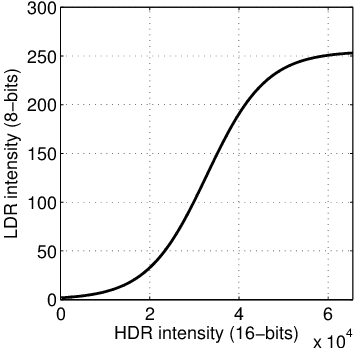
Close with a gentle S-curve in the Tone Curve panel to restore punchy blacks and clean whites without losing detail in the brightest pixels.
Step 4: Correct Lens and Perspective
Apply the lens correction profile to remove barrel distortion. Straighten vertical lines so door frames, wall edges, and window mullions render true. Wide-angle interior shots distort most at the frame edges, where the buyer’s attention drifts first.
Step 5: Calibrate White Balance
Sample a known-white surface in the frame, such as a refrigerator door, a window mullion, or a painted ceiling cove. Match the resulting Kelvin reading to the lighting condition of the capture, then apply that value across every frame in the set for visual consistency:
- 3,200K – 4,000K: Indoor warm incandescent or tungsten lighting
- 5,000K – 5,600K: Bright direct daylight or studio strobes
- 6,000K – 7,000K: Cloudy or overcast days, or deep shade
Step 6: Local Adjustments
Make the remaining minor adjustments as the final step. For example, brush down hot spots on reflective surfaces like polished countertops, glossy floors, and stainless-steel appliances. Lift exposure on the shadow side of the room to balance the composition’s visual weight. Replace skies when the original capture cannot recover the window-view highlights.
Common HDR Photo Editing Mistakes and How to Correct Them
Over-Tone-Mapping
Over-tone-mapping pushes the HDR-specific sliders for strength, detail, and clarity past their default positions. The output reads as hyper-contrasty, bright halos form around window frames and door edges, wall surfaces appear oversaturated, and finishes glow from within.
How to avoid Over-Tone-Mapping: Pull every tonal slider back to thirty to fifty percent of default. Treat the HDR merge’s defaults as a ceiling, not a starting point, and re-evaluate the rendering on a calibrated monitor.
Mixing White Balance and Color Casts
Property interiors typically feature three or more competing light sources within a single frame. This includes Tungsten ceiling fixtures, daylight through windows, and LED under-cabinet lighting in kitchens. Without white balance correction, the HDR merge averages the cast across all sources.
How to avoid Mixing White Balance and Color Casts: Sample a known-white reference in every room and align the temperature target across the entire set before exporting. Use the same reference object across all rooms in the listing for consistent calibration.
Motion Artifacts and Bracket Misalignment
Anything that moved during the capture sequence renders as ghosting, doubling, or partial transparency in the merged file. The most common sources are ceiling fans, outdoor foliage outside windows, water, and pets walking through the room.
How to avoid Motion Artifacts and Bracket Misalignment: Combine capture discipline with the right merge settings. Turn off fans, wait for the curtains to settle, and clear the room before the shoot. Raise the deghosting threshold during the HDR merge to reduce motion artifacts.
Under-Bracketing the Dynamic Range
When the original bracket set does not span a sufficient exposure range, the merge cannot recover detail in extreme highlights or deep shadows. This results in instances such as window views render as flat white, where the yard should be visible, and recessed corners render as featureless black.
How to avoid Under-Bracketing the Dynamic Range: Shoot a wider bracket range so the brightest and darkest areas of the scene both fall within the exposures. If a single area still exceeds the bracket range, capture it as a separate exposure and merge it during editing.
Inconsistent Editing Across the Set
Each image in a listing receives a slightly different white balance, saturation level, or tonal curve. The gallery reads as a sequence of one-off edits rather than a coherent presentation.
How to avoid Inconsistent Editing Across the Set: Apply the batch preset method to establish an editing baseline across every remaining frame in the set.
Best Practices for HDR Real Estate Photo Editing
Maintain Brand Consistency Across the Set
Ensure every image within a single listing shares the same white balance, exposure baseline, and tonal register. Lock the temperature on the first image of the set and build a per-listing preset. Propagate the calibration across every remaining frame through batch processing. For instance, a kitchen frame at 5,000K next to a living room at 6,200K reads as careless, even when each image looks acceptable in isolation.
Edit on a Calibrated Monitor
Uncalibrated displays misrepresent shadow detail and color temperature. A set that renders cleanly on a working monitor can shift to gray and muddy on the buyer’s primary viewing device.
Preserve the Master File
Retain the 32-bit floating-point DNG generated by the HDR merge as the master file. It will allow future edits, re-exports, or corrections to start from the file itself rather than a fresh bracket merge.
Note: The 16-bit TIFF produced after tone mapping is the working file for export, not the master.
Apply Targeted Noise Reduction
Apply noise reduction selectively rather than globally. Shadow regions, especially in low-light interior corners, accumulate noise that the merge amplifies. Mask the reduction so that high-detail surfaces such as wood grain, fabric weave, and tile texture retain their micro-contrast. A global noise pass softens texture across the entire image and reads as a smudge effect when viewed at full size.
Standardize the Export Specs to the Multiple Listing Services
Different MLS systems impose different file-size, pixel-dimension, and color-space requirements, with most requiring sRGB output for web display. Build the export preset once against the destination MLS profile, then apply it to every listing routed to that system. Mismatched specs trigger MLS-side auto-compression, auto-resizing, or color-space conversion, each of which degrades the final rendered output.
How to Quality Check HDR Real Estate Photo Editing
The Perimeter Check
Scan the outermost 5% edge of the frame at 100% zoom. Wide-angle lens corrections often leave blank white wedges, slivers of uncropped pixels, or repeated edge patterns in the corners after straightening.
The Perspective Check
Verify that walls, door frames, window mullions, and corner edges read true vertical. Tilted verticals indicate keystone distortion due to camera tilt or misapplied lens correction. Confirm alignment with the alignment grid or perspective-correction tools before export.
The Halo Audit
Inspect high-contrast boundaries, specifically where rooflines meet sky and interior window trim meets glass. A faint white glow at the boundary indicates global clarity has been pushed too far, or the window brush feathering is too tight. Lower the clarity setting or refine the mask edge until the halo disappears.
The Reflective Mask Scan
Zoom in on stainless steel appliances, polished stone countertops, glass tabletops, and bathroom mirrors. Confirm that reflections of the photographer or tripod have not been amplified by shadow-lifting. If visible, mask the reflection out before export.
The Chromatic Aberration Test
Examine high-contrast boundaries (window panes, dark furniture against light walls, tree branches against sky) for purple or green color fringing. If present, confirm the “Remove Chromatic Aberration” setting is enabled in the lens correction panel. Then apply a manual de-fringe to any pixels the automatic correction misses.
The Gradient Banding Sweep
Check smooth gradient surfaces (skies, plain walls, ceilings, and large painted areas) for visible step transitions between tonal values. HDR tone mapping compresses the dynamic range and can introduce banding in gradients that looked smooth in the source brackets. If present, apply a small amount of noise or dither to the affected region.
The Black Point Check
Verify that baseboards, heavy furniture feet, rug edges, and shadow zones under low-profile furniture maintain true black points. If they appear to float or look hazy, the tone mapping has flattened the micro-contrast too severely. Reduce the local contrast setting or add a black point on the tone curve to restore the anchor.
The Consistency Pass
Open every image in the listing as thumbnails on one screen and review them as a sequence rather than as individual frames. Verify that white balance, exposure baseline, and tonal register hold steady from one frame to the next. Even with a per-listing preset locked in, individual local adjustments can drift the overall feel of single images out of alignment with the set. If a single image appears warmer, cooler, brighter, or darker than the others, recall it and realign it to the set baseline. The buyer scrolls the gallery in sequence, so the set has to read as a sequence.
How to Apply Layered Flash Correction in HDR Editing
The HDR merge handles dynamic range but has limitations: mixed-source lighting leaves residual color casts, pure ambient light flattens material texture and shadow detail, and tonal averaging across brackets can flatten surface dimensionality.
In a layered image editor, place a separate flash-lit exposure over the merged HDR file at low opacity. Apply the blend mode depending on the objective, such as;
- Color Cast Correction: Color blend mode transfers neutral flash color to the merged file without disturbing the ambient luminance.
- Shadow Detail and Texture Restoration: Luminosity blend mode applies clean flash brightness, restoring micro-detail in wood grain, fabric weave, and painted surfaces.
- Dimensionality and Material Accuracy: The Soft Light or Overlay blend mode introduces directional lighting, adding subtle specular highlights and micro-shadows that ambient HDR alone can flatten.
The Business Imperative for HDR Photo Editing for Real Estate
Every listing that ships with inconsistent color, soft shadows, or rejected MLS specs costs the business twice. The first cost shows up as a revision cycle. The second shows up as a market-positioning loss. The difference lies in how businesses manage their photo editing operations.
In-house teams lack the specialized tools, standardized workflows, and domain expertise that a market-ready listing set demands. It also carries a fixed-cost burden the business pays whether listings ship or not: software licenses, a calibrated monitor, a workstation, backups, and editor pay. On the contrary, specialized HDR photo-editing services absorb that cost structure into their per-image pricing. They offer domain expertise and a technical stack at scale.
The question is not whether HDR photo editing for real estate deserves investment. It is about whether the in-house teams can deliver anything the specialist cannot, faster and cheaper, while scaling with your business requirements.