









Cybersecurity for Businesses is no longer just an IT department checklist item; it is a core requirement for commercial survival. Small startups and large corporations alike face relentless cyber-attacks every single minute. Hackers do not just target massive tech conglomerates, they target any company with accessible data, weak security controls, or uninformed employees. A single security breach can cost millions of dollars, damage your corporate reputation, and trigger severe legal penalties.
Protecting your company assets requires a proactive strategy that integrates human awareness, smart policies, and advanced technology. The following guide breaks down proven strategies to guard your infrastructure against modern cyber threats.
What is Cybersecurity for Businesses?
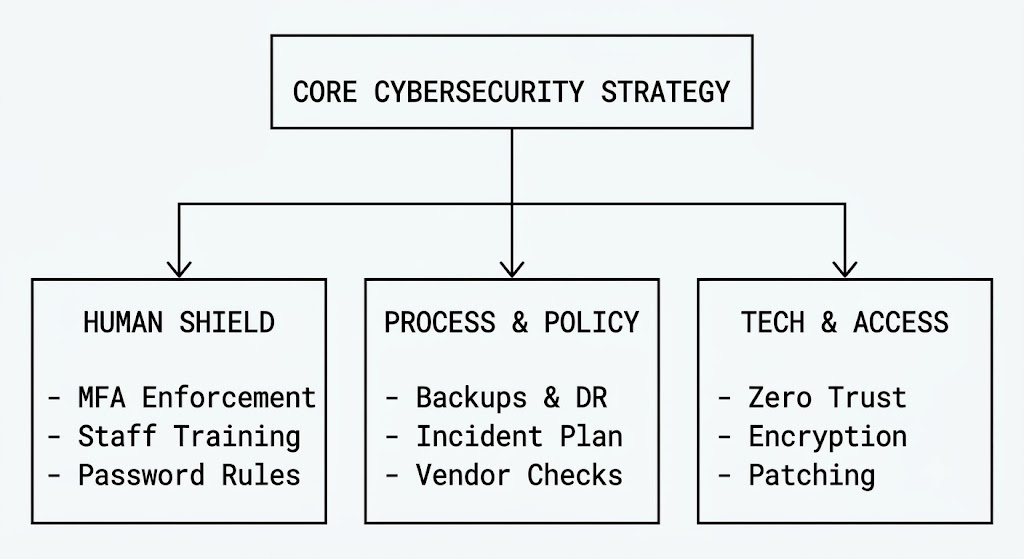
Cybersecurity for businesses is the practice of protecting company networks, devices, software applications, and sensitive data from digital attacks, unauthorized access, and malicious breaches. It combines technology, clear operational policies, and staff training to defend corporate assets against operational disruptions and financial loss.
15 Actionable Cybersecurity Tips to Protect Your Business Data
Implement Multi-Factor Authentication (MFA) Everywhere
Passwords alone cannot secure your systems anymore. Cybercriminals use sophisticated phishing scripts, credential stuffing, and brute force attacks to crack standard logins within seconds. Multi-factor authentication adds a critical second layer of defense by requiring users to prove their identity with two or more verification factors.
- Combine something the user knows (a strong password) with something they have (an authenticator app or security key).
- Block over 99 percent of automated account compromise attacks instantly.
- Mandate MFA across all corporate email accounts, cloud storage platforms, VPNs, and financial portals.
Conduct Regular Employee Security Awareness Training
Human error remains the leading cause of data breaches worldwide. Your employees interact with external emails, link requests, and file downloads constantly. Without clear education, a well-meaning team member might accidentally hand over administrative access to a malicious actor.
- Schedule mandatory monthly or quarterly security workshops.
- Run simulated phishing tests to evaluate employee readiness and identify weak links.
- Teach workers how to recognize suspicious links, spoofed email addresses, and social engineering tricks.
Adopt a Strict Zero Trust Architecture
The traditional perimeter security model operates on a flawed concept: trust everything inside the internal network and block everything outside. Zero Trust changes this dynamic entirely. Under a Zero Trust model, your network treats every access request as a potential threat, regardless of where it originates.
- Never trust, always verify every connection request.
- Validate identity, device health, and context continuously before granting system access.
- Limit network movement so attackers cannot pivot easily if they breach one entry point.
Enforce Automated Patch Management
Outdated software acts as an open invitation to cybercriminals. Hackers study released updates, locate known vulnerabilities in older software versions, and launch automated scans to find unpatched business servers.
- Automate operating system and software updates across all company machines.
- Update web browsers, office applications, and remote work tools immediately upon release.
- Prioritize critical patches that address high-severity remote code execution vulnerabilities.
Establish Robust Data Backup and Recovery Protocols
Ransomware attacks can freeze your operational databases in seconds. If an attacker encrypts your vital records, having isolated, uncorrupted backups gives you total leverage and keeps your company running without paying a ransom.
- Follow the 3-2-1 backup rule: Keep 3 copies of your data on 2 different media types, with 1 copy stored completely offline or offsite.
- Test your data restoration procedures quarterly to verify backup integrity.
- Secure backup files with strong encryption and isolated access permissions.
Deploy Next-Generation Firewalls and Endpoint Security
Basic antivirus programs cannot stop modern, fileless malware or memory-based exploits. Next-Generation Firewalls (NGFW) and Endpoint Detection and Response (EDR) platforms track network behaviors in real time to catch sophisticated threats.
- Use EDR agents on all workstations, laptops, and servers to monitor suspicious activity.
- Filter inbound and outbound web traffic to block known malicious IP addresses.
- Isolate compromised devices automatically to prevent malware from spreading across the local network.
Secure Remote Work and BYOD Devices
The shift toward remote work expanded the corporate attack surface dramatically. Unsecured home networks and personal devices often lack the safety controls found inside an office environment.
- Mandate company-managed Virtual Private Networks (VPNs) with strong encryption for remote access.
- Establish a clear Bring Your Own Device (BYOD) policy that enforces security software installation on personal phones and laptops.
- Separate work profiles from personal usage to keep business data contained.
Restrict Administrative Privileges
Giving every employee administrative rights increases your security risks significantly. If a user account with high-level access gets compromised, the attacker instantly gains the keys to your digital infrastructure.
- Apply the Principle of Least Privilege (PoLP), granting employees access only to the files they need to perform their daily job.
- Audit user accounts quarterly to revoke unnecessary administrative privileges.
- Use dedicated, isolated accounts for IT administration instead of everyday browsing logins.
Protect Mobile Devices with Enterprise Mobility Management
Smartphones and tablets hold massive amounts of company communications, operational emails, and sensitive documents. Losing an unencrypted corporate phone can trigger a severe regulatory data breach.
- Install Enterprise Mobility Management (EMM) software to oversee corporate mobile assets.
- Enable remote wipe capabilities so you can erase lost or stolen devices instantly.
- Enforce device-level PINs and biometric locks across all mobile hardware.
Perform Vulnerability Scans and Penetration Tests
You cannot fix safety gaps if you do not know where they exist. Vulnerability assessments use automated tools to locate security flaws, while penetration testing hires white-hat hackers to test your defenses actively.
- Run weekly automated vulnerability scans across your external and internal network perimeters.
- Hire third-party penetration testers at least once a year to evaluate your systems against real-world attack techniques.
- Address high-risk discoveries immediately based on potential impact.
Encrypt Sensitive Data at Rest and in Transit
Data encryption transforms readable information into unreadable ciphertext. Even if cybercriminals intercept your files or steal a hard drive, strong encryption renders the stolen data completely useless without the proper decryption keys.
- Use full-disk encryption like BitLocker or FileVault on all corporate laptops.
- Enforce HTTPS and TLS protocols for all web communication and data transfers.
- Protect customer records, financial databases, and employee logs with industry-standard AES-256 encryption.
Monitor Network Traffic Continuously with SIEM Tools
Cyber-attacks rarely happen out of nowhere. Hackers often spent weeks probing networks and testing credentials before taking visible action. Security Information and Event Management (SIEM) tools aggregate system logs to surface suspicious patterns early.
- Centralize system logs from servers, firewalls, and applications into one dashboard.
- Set up automated real-time alerts for unusual login times, massive file downloads, or unauthorized access attempts.
- Analyze network behavior metrics to catch threats before they trigger major downtime.
Secure Supply Chain and Third-Party Vendor Access
Many enterprise data breaches start with an attack on a third-party vendor. Contractors, software suppliers, and service providers often connect directly to your network, creating potential backdoors for hackers.
- Conduct thorough security audits on all third-party vendors before granting system access.
- Require contractors to follow your company security standards and MFA protocols.
- Grant vendors access strictly via temporary, monitored network connections.
Formulate an Incident Response Plan (IRP)
When a security incident hits, confusion causes costly delays. A well-designed Incident Response Plan gives your team clear, step-by-step guidance on how to contain, investigate, and fix a breach efficiently.
- Assign specific duties to IT teams, executives, legal counsel, and public relations representatives.
- Outline exact isolation steps to disconnect infected servers without losing operational evidence.
- Practice tabletop breach simulations twice a year to keep your team prepared.
Enforce Strong, Managed Password Policies
Weak, reused passwords remain a primary access route for cyber attackers. Encouraging employees to memorize dozens of complex passwords manually often leads to bad habits, such as writing logins on sticky notes or reusing simple variations across accounts.
- Deploy enterprise password managers like 1Password or Keeper across your organization.
- Ban common passwords and enforce minimum length requirements of 14 characters or more.
- Use random passphrases instead of complex strings that users find hard to remember.
High-Value Core Protections Overview
| Security Measure | Primary Threat Mitigated | Difficulty to Implement | Priority Level |
|---|---|---|---|
| Multi-Factor Authentication | Credential Theft & Phishing | Low | Critical |
| Data Backups (3-2-1 Rule) | Ransomware & Hardware Failure | Medium | Critical |
| Zero Trust Access Controls | Internal Pivoting & Privilege Escalation | High | High |
| Employee Security Training | Social Engineering & Business Email Compromise | Low | High |
| Full Disk Encryption | Physical Theft & Data Interception | Low | High |
| EDR / Endpoint Monitoring | Advanced Malware & Zero-Day Exploits | Medium | High |
Conclusion: Build Your Cyber Defense Posture Today
Building robust cybersecurity for businesses requires continuous effort rather than a one-time setup. Cyber threats adapt constantly, but establishing strong security protocols significantly reduces your exposure to costly data breaches. Focus on high-impact wins first: deploy MFA company-wide, isolate clean offsite backups, and train your staff to spot suspicious emails.
A proactive defense strategy protects your revenue, builds customer trust, and secures your company’s long-term future in a connected world. Start auditing your digital infrastructure today to identify weak points before attackers exploit them.
FAQs
What is the single most effective cybersecurity step for small businesses?
Enforcing Multi-Factor Authentication (MFA) across every login portal provides the single highest security return on investment. MFA blocks over 99 percent of automated account takeover attempts instantly, making it the most essential baseline protection for small teams.
How does ransomware enter a business network?
Ransomware typically enters a corporate system through malicious email links, infected file attachments, unpatched software vulnerabilities, or compromised remote desktop credentials. Once executed, it encrypts critical files and demands payment for the decryption key.
How often should a business back up its data?
Businesses should run automated, continuous backups for active operational databases and perform full system backups daily. Companies must also test data restoration procedures quarterly to verify backup files remain functional and clean.