









Generative AI uses vector databases to connect raw data with meaningful context-rich outputs. If large language models didn’t have these specialized storage systems, they would have a difficult time remembering relevant information or responding to a user. Ever wonder how ChatGPT is able to remember part of a long conversation, or how an image generator can match the style of a million images? Ever wonder how ChatGPT is able to remember part of a long conversation, or how an image generator can match the style of a million images? The key is to use vector databases.
Let me explain to you just how this technology works and why it’s so important to generative AI, as well as some places you can use it now.
What Makes Vector Databases Different
Traditional databases have information stored in rows and columns. You query the database for “customers with the name Smith who purchased a blue shirt” and the data returns a customer with the name Smith who purchased a blue shirt. This isn’t the way generative AI operates. Must discover meanings, similarities and connections. That’s where vector databases step in.
A vector database is a database that holds mathematical embeddings of data. Imagine that each piece of content is an arrow in a high dimensional space. Content point similarities in a similar direction. The database sorts millions of such arrows to be able to retrieve those that are most similar to the query.
Here are some of the features of vector databases:
- High speed similarity search across millions or billions of vectors
- Support for real time updates as new content arrives
- Built for approximate nearest neighbor (ANN) algorithms, not exact matching
- Works with any data type: text, images, audio, code, or sensor data
How Generative AI Creates and Uses Vector Databases
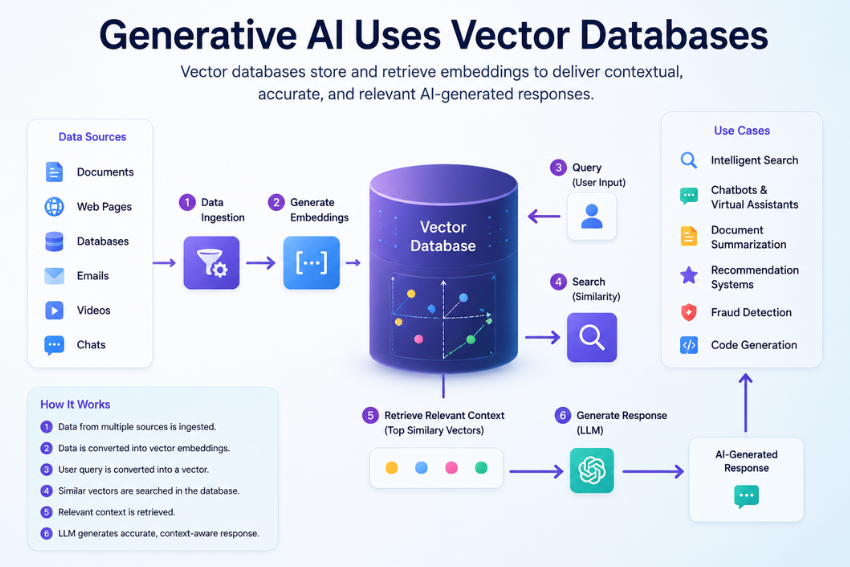
Generative AI models convert your input into a vector behind the scenes. The model converts the words that you enter into the text field to a numerical vector. The model converts the words you enter into the text field to a numerical vector, when you type in “give me recipe ideas with leftover chicken and rice”. This vector reflects the essence: cooking, ingredients for the pantry, fast food, savory flavors.
Then the model uses that query vector to query the vector database: “Find me the closest vectors to this one.” The database provides snippets of relevant data, like similar recipes, cooking directions and even user feedback. Those retrieved chunks are then used by the generative model to generate a new, informative response.
This occurs in msecs. The vectors are not shown. You only receive a response that’s conscious of your particular request.
The Secret Sauce: Retrieval Augmented Generation (RAG)
Most people believe generative AI only regurgitates all that it was fed. That is false. The model has a known date of knowledge and cannot know your private company information. Retrieval Augmented Generation (RAG) addresses both of these issues.
Here is the flow:
- You ask a question.
- The system converts your question into a vector.
- The vector database fetches the most relevant documents from your own knowledge base.
- The generative model crafts an answer using only those retrieved documents as a reference.
RAG avoids hallucinating as the model is grounded with the retrieved information. It also provides protection of sensitive data. You never have to move your data to your vector database or your own cloud.
Real World Examples You Can Use Today
Customer Support Automation
A telecom firm uploads thousands of support tickets, product manuals and call transcripts into a vector database. If a customer asks “how do I reset my router after a power outage”, the generative AI searches the manual to find the exact steps and writes out a step-by-step friendly answer to the person’s question. A voice record is not picked up by a human agent.
Personalized Content Recommendations
Stream services store content embedding and user watch history in a vector database. Once you watch a thriller film, the generative AI is not simply looking for “other thrillers.” It looks for scenes that have similar character archetypes, plot twists, and pacing. It then provides a personalized description of why you may like each recommendation.
Code Generation for Internal Libraries
Development teams store function signatures, API documentation, and code examples as vectors. What if a programmer asks, “how do I use our JWT middleware to authenticate a user? The generative AI will pull the proper helper function from your codebase, and generate a ready-to-use snippet, not a template from the internet.
Why Every Generative AI Application Needs a Vector Database
It’s possible to store embeddings in a standard database, and perform a brute force similarity check. That’s not scalable. Comparing each vector one-by-one to get to 10 million vectors takes seconds to minutes. With advanced indexing techniques such as HNSW (Hierarchical Navigable Small World) graphs or IVF (Inverted File Index), vector databases can provide that kind of speed. Vector databases achieve that kind of speed with advanced indexing techniques like HNSW (Hierarchical Navigable Small World) graphs or IVF (Inverted File Index).
Other advantages include:
- Real time updates. As soon as you add a new document, it is discovered.
- Filtering. Combine vector search with metadata filters like “date after 2023” or “author = Jane.”
- Hybrid search. Use vector similarity in conjunction with keyword matching for even better results.
- Scalability. Shard and replicate vectors without compromising the speed of the application.
Common Pitfalls and How to Avoid Them
- Using the wrong embedding model: Each embedding model will capture the meaning in a different way. An OpenAI embedding is excellent for general text, but not very suitable for medical codes or legal clauses. Run tests on actual data with at least two models before making the decision.
- Ignoring chunking strategy: There is a failure to segment documents into chunks (paragraphs or pages) prior to embedding. If chunks are too big, they dilute the meaning. Chunk too small becomes lost in context. The rule of thumb is chunk at 200-500 tokens and overlap chunks by 10-20%.
- Forgetting about storage costs: Vector databases store decimal (floats) numbers. A 768-dimensional vector uses approximately 3 Kilobytes. Times that by 100 million documents, and you need hundreds of gigabytes. Use product quantization or scalar quantization to save 80% of storage with little loss of accuracy on vectors.
- What Comes Next: Vector databases and generative AI will grow more intertwined over the next few years. Here are three trends worth watching.
- Multimodal vectors: Instead of having a text vector and an image vector, new models generate a single multimodal vector representing both text and image. In a single search, you can find images, video frames, and audio descriptions that match the term “red car”.
- On device vector databases: Smaller embedding models and faster ANN indexes enable vector search to be performed on phones or edge devices. Your generative AI assistant will work on your local device and will not send anything to the cloud to get your own notes and messages.
- Self-tuning vector indexes: Databases will optimize for query patterns, rebuild indexes, and change compression levels, all automatically. You won’t need a separate engineer solely to maintain the database fast.
Conclusion
Generative AI uses vector databases not as an optional add on, but as the core memory system that makes real time, personalized, and factual generation possible. No matter you’re creating a chatbot to help your support team or a code assistant for your engineers, begin with a vector database. As your users experience the difference the first time the AI provides them with the information they need, and not just what it memorized last year.
Frequently Asked Questions
Can I use a vector database without generative AI?
Yes. There are a number of applications that do not require generative models, such as recommendation engines, fraud detection, and image similarity search. Vector databases simply perform a similarity search easily, regardless of what they are used for.
Which vector database should I start with?
Pinecone, Weaviate and Qdrant seem to be good options for production scale. Chroma or LanceDB since they are locally running with minimal set up for learning. In case of small projects, PostgeSQL + Pgvector is also good enough.
Does a vector database replace my existing SQL or NoSQL database?
No. Both are used in most production apps. Keep user profile, orders and log in your normal database. Embeddings in vector database. Then, fuse results together at the application layer.
How do I measure if my vector search is accurate?
Use recall at k. That metric tells you what percentage of truly relevant vectors appear in the top k results. Aim for recall above 90 percent at k equals 10. Also track query latency and index building time.