








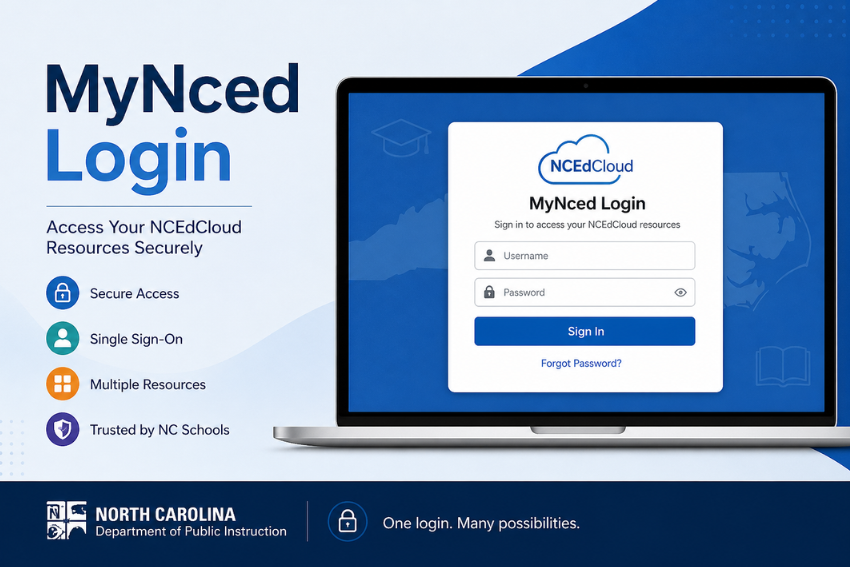
MyNced Login is a portal that gives students, teachers, staff and parents in North Carolina’s public schools access to a single online learning platform. If you have ever had to keep track of different passwords for various educational platforms, it does all this in a neat, efficient manner.
We will explain this in simple terms, without all the tech-speak. From first-time login to solving problems, this article has everything you need.
What is MyNced Login?
MyNced Login is a part of the NCEdCloud IAM Service (Identity and Access Management). It is a secure single sign on system that provides access to a range of educational applications with a single set of credentials.
Rather than using multiple user IDs and passwords, you only need to sign in once to access resources such as learning management systems, student records and school resources.
Why It Matters
Think about how often login issues slow down productivity. This system reduces friction by centralizing access.
Here’s what makes it useful:
- One login for multiple applications
- Strong security protocols
- Faster access to classroom tools
- Reduced password fatigue
- Easy management for administrators
Who Can Use MyNced Login?
The system is designed for a wide range of users within North Carolina’s K-12 public schools.
Primary Users Include:
- Students
- Teachers
- School administrators
- District staff
- Parents with linked accounts
Each group gets role-based access, which means the tools you see depend on your role in the system.
How to Access MyNced Login
Getting started is simple, but there are a few steps you need to follow correctly.
Step by Step Login Process
- Open your browser
- Visit the official login portal at my.ncedcloud.org
- Enter your username
- Type your password carefully
- Click the login button
If your credentials are correct, you will land on your personalized dashboard.
Pro Tip
Always bookmark the official login page to avoid phishing risks. Many users accidentally visit fake pages due to simple typos.
Understanding Student Login Methods
Students often use a slightly different process compared to staff.
QR Code Login
Many younger students log in using QR codes. It’s quick and avoids typing errors.
Steps include:
- Open the login page
- Select QR code option
- Scan using school issued device
Student UID Login
Older students may use:
- Student ID or UID
- Password provided by the school
Teacher and Staff Login Process
Teachers and staff typically use a more traditional login method.
Required Credentials
- Username assigned by the district
- Secure password
Additional Security Layers
Some districts may enable:
- Multi factor authentication
- Security questions
- Session timeouts
These measures protect sensitive student data and administrative tools.
Features of the NCEdCloud IAM Service
This system is more than just a login portal. It acts as a central hub for digital learning.
Key Features
- Single sign on access
- Role based dashboards
- Secure identity management
- Integration with learning tools
- Password reset options
Integrated Applications
Once logged in, users can access:
- Learning management systems
- Student data platforms
- Communication tools
- Assessment software
Everything sits in one place, which reduces time spent switching between platforms.
How to Reset Your MyNced Login Password
Forgetting passwords happens. The system includes a straightforward recovery process.
Password Reset Steps
- Go to the login page
- Click on forgot password
- Enter your username
- Answer security questions
- Create a new password
Password Tips
To avoid future issues:
- Use a strong password with mixed characters
- Avoid common words or patterns
- Do not reuse old passwords
Common MyNced Login Issues and Fixes
Even a well-designed system can run into occasional problems. Here are the most common ones and how to fix them.
Incorrect Username or Password
This is the most frequent issue.
Fix:
- Double check spelling
- Ensure caps lock is off
- Reset password if needed
Account Locked
Too many failed login attempts can lock your account.
Fix:
- Wait for automatic unlock
- Contact school IT support
Browser Compatibility Issues
Sometimes the issue is not your login, but your browser.
Fix:
- Use updated browsers like Chrome or Firefox
- Clear cache and cookies
- Disable unnecessary extensions
Network Problems
Slow or unstable internet can interrupt login attempts.
Fix:
- Check your connection
- Switch networks if possible
Security Best Practices for MyNced Login
Security should not be an afterthought, especially when dealing with educational data.
Follow These Practices
- Never share your login credentials
- Log out after each session
- Avoid using public WiFi without protection
- Update passwords regularly
- Report suspicious activity immediately
Benefits of Using MyNced Login
The system brings real advantages to both users and administrators.
For Students
- Faster access to learning tools
- Less time spent on login issues
- Better focus on coursework
For Teachers
- Streamlined classroom management
- Easy access to resources
- Improved workflow
For Schools
- Centralized control
- Enhanced data security
- Reduced IT workload
Tips to Improve Your Login Experience
A few small adjustments can make a big difference.
Quick Tips
- Save login page as a bookmark
- Use a password manager if allowed
- Keep your device updated
- Log in during off peak hours if servers feel slow
Mobile Access for MyNced Login
Many users prefer accessing the platform on mobile devices.
What You Should Know
- The portal works on mobile browsers
- Some apps may require desktop access
- QR login is especially useful on tablets
Role Based Dashboard Overview
Once logged in, you will notice that your dashboard looks different from others.
Why?
Because access is customized.
Example:
- Students see assignments and learning apps
- Teachers see class management tools
- Admins see system controls
This structure keeps the interface clean and relevant.
Troubleshooting Advanced Issues
If basic fixes do not work, you may need deeper troubleshooting.
Advanced Solutions
- Check district announcements for outages
- Try logging in from another device
- Contact school IT department
- Verify account status with administrator
Final Thoughts
MyNced Login offers easy access to educational resources with robust security measures. It eliminates the confusion of multiple passwords and provides a streamlined interface.
Once you understand how it works, it is easy. It allows students to submit work and teachers to manage their classes all from one place.
Knowing the fundamentals, best practices and troubleshooting tips will help you navigate this system efficiently. And in the online world, time is everything.
Frequently Asked Questions
What is MyNced Login and why do schools use it?
MyNced Login is a secure single sign on system used by North Carolina public schools. It allows students, teachers, and staff to access multiple educational tools with one set of credentials.
Schools use it because it:
- Reduces password confusion
- Improves data security
- Saves time during daily logins
- Centralizes access to learning platforms
This structure keeps both users and administrators efficient.
Can parents use MyNced Login?
In some cases, yes. Parents can access certain features if their accounts are linked through the school system.
Access depends on district policies, but it may include:
- Viewing student progress
- Accessing communication tools
- Monitoring assignments
Parents should contact the school for account setup details.
Why is my MyNced account locked?
Your account may get locked after multiple failed login attempts. This is a built-in security feature designed to prevent unauthorized access.
To fix this:
- Wait for the automatic unlock period set by your school
- Or contact your school administrator for immediate help
Avoid repeated attempts with incorrect credentials, as this can extend the lock duration.
How do I contact support for MyNced Login issues?
If basic troubleshooting does not work, you should reach out to your school’s support team.
You can:
- Contact your school’s IT help desk
- Speak with a teacher or administrator
- Check your district’s official website for support details
Most login issues get resolved quickly once reported.
Is MyNced Login secure?
Yes, MyNced Login uses strong security protocols to protect user data.
Security features include:
- Encrypted login sessions
- Account lock after failed attempts
- Role-based access control
- Optional multi factor authentication
Still, users should follow best practices like keeping passwords private and logging out after use.