











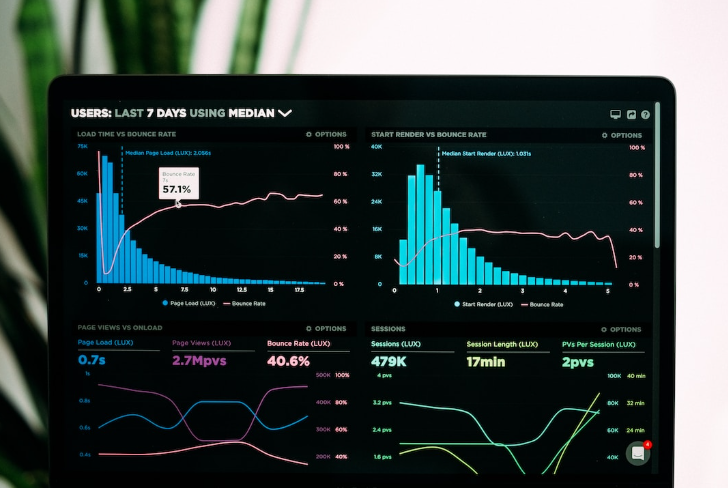
Combination charts in business play a critical role when data refuses to fit neatly into a single visual format. You may have experienced this firsthand. A line chart alone feels incomplete. A bar chart alone hides trends. That is where combination charts step in, blending multiple chart types into one cohesive visual story.
At first glance, they may seem like a simple design choice. In reality, they require thoughtful structure, careful balance, and a clear objective. When used correctly, they transform cluttered datasets into insights that decision makers can actually act on.
Let’s explore how combination charts work, when to use them, and how to apply best practices that elevate your data communication.
What Are Combination Charts in Business?
A combination chart merges two or more chart types into a single visualization. The most common pairing includes:
- Bar chart with a line chart
- Column chart with an area chart
- Stacked bars combined with trend lines
Each element represents a different dimension of the data. For example, revenue might appear as bars, while growth rate runs as a line across the same timeline.
This approach solves a common business problem. Data often contains multiple variables with different scales. A single chart type struggles to show them clearly. A combination chart aligns them with one view without sacrificing clarity.
Why Businesses Use Combination Charts
Data visualization is not about decoration. It is about clarity and persuasion. Combination charts serve both purposes effectively.
They Show Relationships Clearly
When you present multiple datasets together, patterns become easier to spot. For example:
- Sales volume versus profit margin
- Marketing expenses versus customer acquisition
- Inventory levels versus demand trends
Seeing these side by side helps teams understand cause and effect faster.
They Reduce Dashboard Clutter
Instead of placing several charts on a dashboard, a single combination chart can communicate the same story. This saves space and keeps attention focused.
They Improve Decision Making
Executives often prefer visuals that combine summary and trend analysis. A combination chart delivers both without forcing them to jump between visuals.
When to Use Combination Charts
Not every dataset needs a combination chart. Overuse can confuse rather than clarify.
Use them when:
- You need to compare two datasets with different units
- One dataset represents totals while another shows trends
- You want to highlight correlation between variables
- Your audience needs both detail and overview in one view
Avoid them when:
- Data is too simple for multiple layers
- Variables do not relate to each other
- The chart becomes visually crowded
Types of Combination Charts Used in Business
Different scenarios call for different chart pairings. Understanding these types helps you choose wisely.
Column and Line Combination
This is the most widely used format. Columns display absolute values, while the line shows trends.
Example use cases:
- Monthly revenue with growth rate
- Sales volume with target achievement
Bar and Line Combination
Similar to column and line, but horizontal. Works well when labels are long or categories are numerous.
Area and Line Combination
Area charts emphasize volume or magnitude. Pairing with a line adds trend clarity.
Example:
- Website traffic volume with conversion rate
Stacked Bar with Line
This format breaks down totals while showing overall trend.
Example:
- Product category sales with total revenue trend
Key Elements of an Effective Combination Chart
A combination chart works only when each component serves a purpose. Random layering leads to confusion.
Clear Axis Structure
Use separate axes when data scales differ significantly. For instance:
- Left axis for revenue
- Right axis for percentage growth
Make sure both axes are clearly labeled.
Distinct Visual Styles
Each dataset must stand apart visually. Use:
- Different colors
- Varying thickness for lines
- Contrasting shapes for bars
Avoid subtle differences that users struggle to distinguish.
Logical Data Pairing
Only combine datasets that relate meaningfully. Random combinations dilute the message.
Balanced Design
Too many elements create noise. Keep the chart focused on key insights.
Tips to Design Better Combination Charts
Below are the practical tips that help you move from basic visuals to high impact business charts.
Start with a Clear Objective
Before you open any tool or select a chart type, define the purpose of your visualization. This step is often skipped, yet it determines everything that follows.
Ask yourself:
- What question should this chart answer
- What insight should the viewer take away
- What decision should this support
For instance, if your goal is to show how marketing spend affects revenue growth, your design choices will naturally focus on those two variables. Without a clear objective, you risk adding unnecessary elements that dilute the message.
Choose the Right Data Pairing
Not all datasets belong together. A combination chart works best when the datasets share a logical relationship.
Strong pairings include:
- Revenue and profit margin
- Sales volume and conversion rate
- Website traffic and bounce rate
Weak pairings confuse the viewer because they lack context. If the connection between datasets is not immediately obvious, reconsider the design or separate the visuals.
Establish Visual Hierarchy
A good chart guides the eye. It tells the viewer where to look first, second, and third. Without hierarchy, everything competes for attention.
You can create hierarchy by:
- Using bold colors for primary data
- Keeping secondary data lighter or thinner
- Positioning key elements prominently
For example, if revenue is your main focus, make the bars more visually dominant while keeping the trend line subtle but clear.
Use Color Strategically
Color is one of the most powerful tools in chart design, yet it is often misused. Avoid choosing colors purely for aesthetics. Every color should communicate meaning.
Best practices include:
- Assign consistent colors to recurring metrics
- Use contrasting shades to differentiate datasets
- Avoid overly bright or clashing combinations
Limit your palette to a few strong colors. Too many shades make the chart harder to interpret.
Keep Axes Clear and Honest
Axes play a critical role in how data is perceived. In combination charts, dual axes are common, but they require careful handling.
Ensure that:
- Each axis is clearly labeled
- Units are easy to understand
- Scaling does not distort relationships
If the viewer needs to pause and decode the axes, the chart has already lost effectiveness.
Simplify Without Oversimplifying
Clarity should always be your priority, but do not remove essential information in the process.
To strike the right balance:
- Remove unnecessary gridlines or decorations
- Keep labels concise but informative
- Focus on the data that drives insight
A well-designed chart feels clean yet still delivers depth.
Highlight Key Data Points
A combination chart often contains a lot of information. Highlighting specific points helps guide interpretation.
You can emphasize:
- Peak values
- Sudden drops
- Milestones or targets
Use markers, callouts, or subtle annotations. These elements draw attention without overwhelming the design.
Maintain Consistent Scaling and Alignment
Misalignment is one of the quickest ways to confuse your audience. Ensure that all elements in the chart align properly.
Check for:
- Even spacing between categories
- Accurate alignment between bars and line points
- Consistent intervals on axes
Small inconsistencies can disrupt readability more than you might expect.
Avoid Overcrowding the Chart
It is tempting to include every available data set, especially when working with rich business data. Resist that urge.
Too much information leads to:
- Visual clutter
- Reduced clarity
- Slower comprehension
Instead, focus on the most relevant datasets. If additional data is needed, consider creating a separate chart.
Use Labels and Legends Effectively
Labels should clarify, not clutter. Place them where they are easy to read without overlapping other elements.
Best practices:
- Use direct labeling when possible, instead of legends
- Keep text short and precise
- Position labels close to the data they describe
A viewer should not have to search for meaning.
Design for Your Audience
Different audiences interpret charts differently. A technical team may appreciate detailed data, while executives often prefer high level insights.
Tailor your design by:
- Adjusting the level of detail
- Choosing appropriate terminology
- Highlighting insights that matter most to the audience
Understanding your audience ensures that your chart communicates effectively.
Test Readability at a Glance
A strong combination chart should deliver its core message within a few seconds. If it takes too long to understand, the design needs refinement.
Quick test:
- Look at the chart for five seconds
- Identify the main insight
- Ask if the message is immediately clear
If not, simplify or restructure the visual.
Use White Space to Your Advantage
White space is not waste space. It improves readability and helps separate elements.
Benefits include:
- Reduced visual clutter
- Better focus on key data
- Improved overall aesthetics
Do not feel the need to fill every inch of the chart area.
Incorporate Subtle Interactivity When Possible
If your chart will be used in digital dashboards, interactivity can enhance user experience.
Consider features like:
- Hover details for additional data
- Toggle options to switch datasets on or off
- Zoom capabilities for deeper analysis
These features allow users to explore data without overwhelming the initial view.
Validate Before Finalizing
Before presenting your chart, take time to review it critically.
Check for:
- Data accuracy
- Visual clarity
- Alignment with the original objective
It also helps to get a second opinion. A fresh perspective often catches issues you may have overlooked.
Keep Iterating and Improving
Great design is rarely achieved in one attempt. Treat your combination charts as evolving assets.
Improve them by:
- Gathering user feedback
- Observing how they are used in meetings
- Updating them as business needs change
Over time, this iterative approach leads to more effective and refined visualizations.
Common Mistakes to Avoid
Even experienced professionals fall into these traps.
- Overloading the Chart: Adding too many datasets makes interpretation difficult. Simplicity wins.
- Misaligned Axes: Incorrect scaling can distort relationships. Always validate axis ranges.
- Poor Color Choices: Using similar shades reduces clarity. Ensure strong contrast.
- Ignoring Audience Needs: A technical team may understand complexity. Executives often prefer simplicity.
- Lack of Context: Numbers without explanation leave room for misinterpretation. Provide context where needed.
Best Practices for Business Use
Using combination charts effectively in a business environment requires more than basic design knowledge. Below are best practices that ensure your charts deliver real value instead of just visual appeal.
Align Charts with Business Goals
Every combination chart should connect directly to a business objective. Avoid creating visuals just to present data. Instead, focus on the decision the chart is meant to support.
For example, if your goal is to improve profitability, your chart might combine revenue, cost, and margin trends. This alignment ensures that every visual contributes to measurable outcomes rather than adding noise to reports.
Ask these questions before building:
- What decision will this chart influence?
- Who is the primary audience?
- What action should I follow after viewing it?
This clarity shapes both the design and the data selection.
Standardized Design Across Teams
Consistency in chart design builds trust and improves comprehension. When teams use different colors, formats, or labeling styles, it creates confusion and slows down decision making.
Establish internal guidelines such as:
- Fixed color schemes for specific metrics
- Standard font sizes and labeling formats
- Consistent axis placement and scaling rules
For instance, if revenue is always shown in blue and profit in green, stakeholders quickly recognize patterns without needing to relearn each chart.
Standardization also supports scalability. As your organization grows, consistent visuals ensure that reports remain easy to interpret across departments.
Prioritize Data Accuracy and Integrity
Even the most visually appealing chart loses value if the data behind it is inaccurate. Always validate your data sources before presenting a combination chart.
Key practices include:
- Cross checking data with primary systems
- Ensuring time periods align across datasets
- Verifying calculations such as percentages or averages
Small inconsistencies can lead to major misinterpretations, especially when multiple datasets are combined.
Test with Real Users
Designers often assume clarity, but real users may interpret charts differently. Testing your combination chart with actual stakeholders reveals gaps that are not obvious during creation.
Conduct quick reviews by asking:
- What insight do you get from this chart
- Is anything confusing or unclear
- What would you change to improve readability
This feedback loop helps refine both design and messaging. It also ensures that your chart communicates effectively across different levels of expertise.
Focus on Simplicity Without Losing Depth
Combination charts can easily become cluttered. The challenge lies in balancing depth of information with simplicity.
To maintain clarity:
- Limit the number of datasets
- Remove unnecessary gridlines or decorations
- Highlight only the most critical insights
A clean chart does not mean a shallow chart. It means every element serves a purpose.
Use Dual Axes Carefully
Dual axes are common in combination charts, especially when comparing values with different scales. However, misuse can distort perception.
Best practices include:
- Clearly label both axes
- Use distinct colors for each dataset
- Avoid overlapping ranges that confuse interpretation
Always ensure that the relationship shown is accurate and not visually misleading.
Add Context Through Annotations
Numbers alone do not tell the full story. Adding context transforms a chart into a narrative tool.
Use annotations to:
- Highlight spikes or drops
- Explain external factors such as market changes
- Call out key milestones or events
This approach reduces the need for lengthy explanations and keeps the audience engaged.
Integrate Charts into Decision Workflows
A combination chart should not exist in isolation. It should fit into a broader decision-making process.
For example:
- Include it in weekly performance reviews
- Use it in executive dashboards
- Connect it to KPI tracking systems
When charts become part of routine workflows, they drive consistent and informed decision making.
Ensure Accessibility and Inclusivity
Business charts are often viewed by diverse audiences. Accessibility should be a priority.
Consider:
- Using color palettes that are readable for color blind users
- Maintaining sufficient contrast between elements
- Providing clear labels instead of relying only on color
Accessible charts improve usability for everyone, not just specific groups.
Optimize for Different Devices
Modern business environments rely on multiple devices, from desktops to mobile screens. A chart that looks perfect on a large monitor may lose clarity on a smaller screen.
To optimize:
- Keep layouts responsive
- Avoid overly dense visuals
- Test charts on different screen sizes
This ensures that insights remain clear regardless of how the chart is accessed.
Automate Data Updates Where Possible
Manual updates increase the risk of errors and consume valuable time. Automating data connections keeps your charts accurate and up to date.
Benefits include:
- Real time insights
- Reduced manual effort
- Increased reliability
Automation also allows teams to focus on analysis rather than data preparation.
Continuously Improve Based on Feedback
Combination charts should evolve over time. As business needs change, your visualizations should adapt.
Create a feedback loop:
- Collect input from stakeholders regularly
- Monitor how charts are used in decision making
- Refine design based on usage patterns
This iterative approach ensures that your charts remain relevant and effective.
Maintain Ethical Data Representation
It is easy to unintentionally mislead with visualizations, especially when combining datasets. Ethical representation is essential.
Avoid:
- Manipulating axis scales to exaggerate trends
- Omitting data that changes interpretation
- Using misleading visual proportions
Transparency builds credibility and ensures that decisions are based on accurate insights.
Real World Applications of Combination Charts
Combination charts are not theoretical tools. They appear across industries.
- Sales Performance Analysis: A company tracks monthly sales using bars and overlays a line for growth percentage. This helps identify seasonal trends and performance spikes.
- Marketing Campaign Evaluation: Marketers combine ad spend with conversion rates. It becomes easier to see which campaigns deliver real value.
- Financial Reporting: Finance teams display revenue alongside profit margins. This reveals efficiency beyond raw earnings.
- Supply Chain Monitoring: Inventory levels paired with demand trends help prevent stock shortages or overstocking.
How Combination Charts Improve Storytelling
Data storytelling is a skill. Combination charts enhance it by presenting layered insights in a single frame.
Instead of saying:
Revenue increased but profit margins declined
You show both trends together. The audience sees the story instantly.
This reduces explanation time and increases engagement. People remember visuals far better than text.
Tools That Support Combination Charts
Most modern analytics tools support combination charts.
Popular options include:
- Spreadsheet software like Excel
- Business intelligence platforms such as Power BI
- Data visualization tools like Tableau
Each tool offers customization features. Choose one based on your workflow and team expertise.
Advanced Strategies for Experts
If you already use combination charts regularly, consider these advanced techniques.
- Dynamic Data Updates: Connect charts to live data sources. This ensures real time insights.
- Interactive Dashboards: Allow users to toggle datasets on and off. This improves usability.
- Layered Insights: Add subtle overlays such as moving averages or benchmarks.
- Scenario Comparison: Use combination charts to compare actual versus projected performance.
Future of Combination Charts in Business
As data complexity grows, the need for smarter visualization increases. Combination charts will continue evolving.
Trends to watch:
- Integration with AI driven analytics
- Automated chart recommendations
- Enhanced interactivity in dashboards
- Mobile optimized visualizations
Businesses that master these tools gain a competitive edge. They move faster because they understand their data better.
Conclusion
Combination Charts in Business offer a powerful way to visualize complex relationships. They bridge the gap between raw data and actionable insight. When designed with purpose and precision, they become more than charts. They become decision making tools.
The key lies in balance. Combine only what makes sense. Keep the design clean. Focus on the message, not the decoration.
Master this approach, and your data will not just inform. It will persuade.
FAQs on Combination Charts in Business
What is the main purpose of combination charts?
They help display multiple datasets with different scales in one clear visualization.
When should I avoid using combination charts?
Avoid them when the data is simple or unrelated, as this can create confusion.
How many datasets should a combination chart include?
Ideally two or three. More than that reduces clarity.
Are combination charts suitable for executive presentations?
Yes, if designed clearly. They provide both summary and trend insights in one view.